Background
The game is almost nearing it’s deadline, so we are transitioning from implementing gameplay features to getting everything else into the game. During this sprint, I imported and setup all other playable cars, prepped the game for a beta build, and lastly created one new item, the gachapon.
All Playable Cars
Before, there were two cars in the game. However, our modellers have made six other cars (for a total of eight) which have been sitting dormant for the time being. So I started the sprint by importing each of the cars, setting up their materials in Unity (and the variant materials for player 1 and 2), and attaching and configuring the scripts for the car and wheel control.
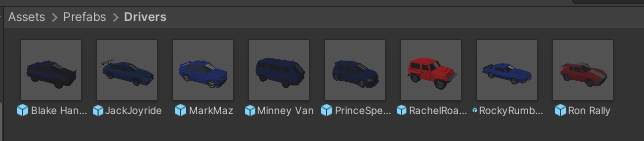
Everyone is here!
The only issue that remains is that, when creating the build, our car selection screen wasn’t quite ready. So the cars are still preset when the player starts a level, but a car selection screen is in the works and nearing completion.
Beta Build
Before creating any builds, I often go through each feature we’d use to sanity check and ensure that they work properly. Our level designer also created a few additional levels with our other developer creating a level selection screen. I had to set the level selection screen to switch betwee each of the stages, while also starting the game. Most, of this is handled with the GameManager I create though, so it was mostly just plugging in and connecting values.
The Gachapon
Lastly, we wanted the items to spawn as a randomized item block, akin to Mario Karts. The idea is to use a gachapon, which will show a random item on the payer’s head, allowing them to input a button action to activate it. The current item system allowed spawning in a random item from a list of prefabs at certain random spots, but would have been messy to make an item block that’d randomly choose an item effect. So, the item system had to be revisited.
This time, the items are a scriptable object instead of prefabs. The scriptable object can be extended to add on extra behavior per each item’s effect. And now, instead of having multiple prefabs for each of the items, there is just one pickup prefab which loads the settings of one of the scriptable object items.
Going back to the gachapon, it accepts a list of these power-up scriptable objects. When the player picks up the item, the gachapon selects one of the power-up effects and executes it.
Still need to make the item’s effect activate on button input, and to randomly shuffle the item visually for the player to see. But, right now, all of the old items work with the new system.