Background
We begin another production group game project again, though with a slightly smaller team than last semester’s CAGD495. Our team is called “Free Tryall” as our game is called “Tryall”. It will be a twin stick shooter, similar to games like Megabonk, Enter the Gungeon, or a lesser known game I used to play called Solomon’s Boneyard.
Players will have access to four skills to combat hordes of enemies and survive as long as possible. They also earn EXP and can upgrade spells as they progress, or collect gold used to ungrade persistent abilities between runs.
As usual, I became one of the programmers.
Starting off
I often like to take control of the repository as I tend to have the most experience with Git, so I created the project. Our group chose Unreal Engine as our game engine of choice, a bit of a challenge when it comes to Git, but I’ve worked out ways to deal with conflicts among blueprints and other binary based, unreal files.
Starting off on the player
Afterwards, I started beginning on player locomotion and controls. Keyboard and mouse are the main forms of control, with WASD to move and mouse to aim. Skills are mapped to left and right mouse buttons, spacebar, and shift (each of the four skills the player can hold).
I was anticipating the aiming to be a bit of a challange, so I’ve already begun trying to understand how unreal can cast 2D mouse positions from the viewport into 3D rays from the camera.
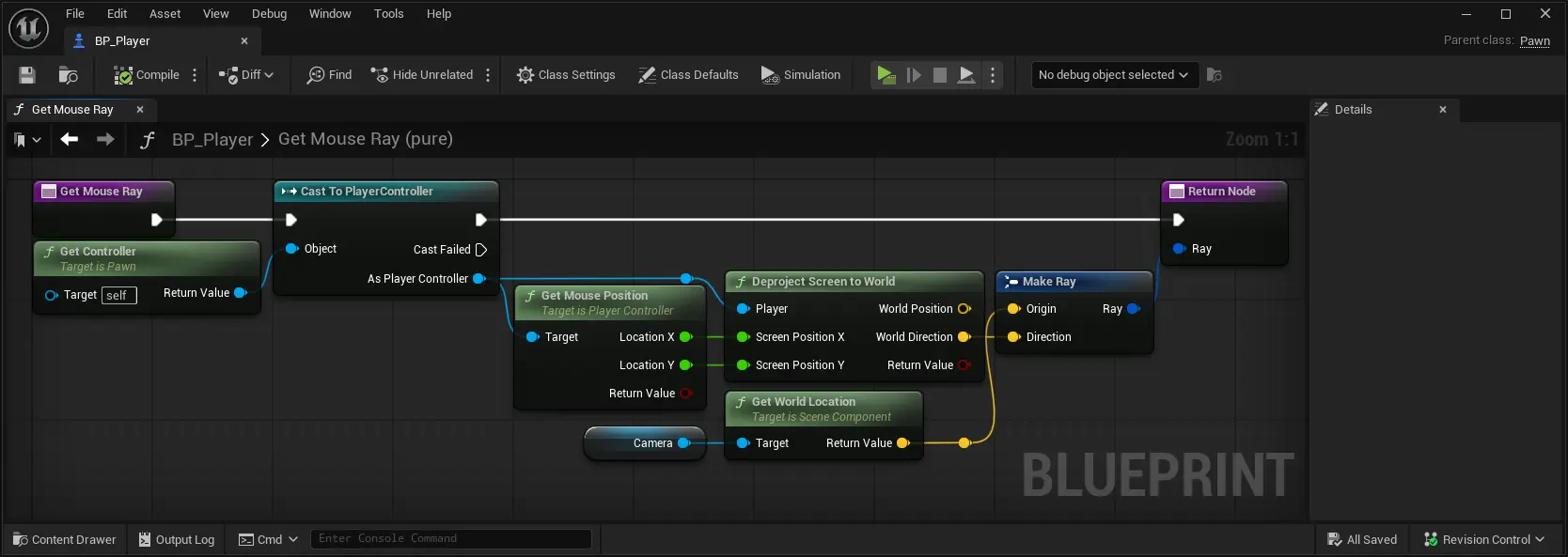
It seems that this can easily be done with the “Deproject Screen to World” to get a direction of the ray. The origin of the ray is simply the camera though, so plug in both values to create the ray. Then we can raycast by scaling the direction by some distance, adding to the origin to get the start and end, then do a trace starting from camera down to where the player is facing.
Finally, putting it together, we have a player that moves around and a target for the player to aim at (although the player doesn’t yet look at the target. still thinking of a clean way to manage that while taking into acount the camera’s orientation).
Following that, I insisted we add gamepad controls to accomadate Steam Deck and couch PC playstyles. And after all, what’s a twin stick shooter without a pair of sticks to use?
Some skills
Next, I started working on the skill system. As the player holds four skills, I decided to first create an enum representing each skill slot, then I created a map variable using that enum as the keys to the map. Each element in the map will contain an object related to each skill we develop, allowing us to activate each of them on command.
To trial this out, we started creating a rapid firing projectile attack, as well as an attack where you swing a melee weapon. One other interesting quality here is that we also wanted some spells to reactivate as the player holds an input, and some that necessitate a new button input to reactivate.
In the above example, the player holds left to repeatedly trigger the projectile skill, and manually presses to retrigger the sword swinging skill.
Next steps
Next, I’ll be working on handling player damage, actually aiming, and ensuring skills are swappable. I’ve begun to hook up aspects of UI screens to the player’s stats, though that’ll be in the next blog post.